Quick-Triage Symptom Matrix: Read the Alarm, Find the Cause
Disc filter troubleshooting follows a symptom-to-cause decision tree: a healthy disc stack operates below ~0.2 bar differential pressure, the backwash trigger is commonly set between 0.5 and 0.7 bar, and drum rotation typically runs at 1–5 rpm depending on model. A 2 AM alarm page gives you about 60 seconds to read the HMI before the shift supervisor calls. Use the table below to match the alarm to a probable cause and jump to the right subsection of this guide. Confirm root cause by checking influent TSS, FOG, and upstream coagulation before disassembling the unit, because most disc filter faults originate upstream of the filter itself (HydropureWater field data, 2026).
| Symptom on panel/gauge | Most likely cause | 5-minute first check | Fix section |
|---|---|---|---|
| High ΔP (>0.7 bar), no recovery | Chemical scaling on disc media | Review backwash cycle log for last 24 h | CIP Recovery Procedure |
| Drum not rotating | VFD fault or hydraulic lock from fouling | Check VFD status and drive current | Drum Won't Rotate |
| Backwash runs but ΔP stays high | Clogged backwash nozzle or strainer | Read backwash pressure at gauge | Backwash Failure |
| Effluent TSS rising, ΔP normal | Torn or channeled disc media | Pull one disc and inspect surface | Effluent TSS Rising |
| Seal leakage at endcap or shaft | Worn mechanical seal or O-ring | Visual inspection for weepage | Preventive Maintenance |
| Abnormal noise or vibration | Worn drive coupling or gearbox | Hand-turn drum with drive isolated | Drum Won't Rotate |
Because disc filters are tertiary filtration units commonly used in water reuse duty, a sudden performance shift should also be cross-checked against the upstream biological and coagulation stages before any mechanical work begins.
High Differential Pressure: Media Fouling vs. Scaling
High differential pressure in a disc filter is caused by either particulate fouling, which is recoverable by backwash, or chemical scaling, which requires a Clean-In-Place (CIP) procedure. A normal filter cycle shows ΔP rising gradually as discs capture solids, then dropping sharply after each automatic backwash; if the cycle interval shortens from a normal 30–60 min down to under 10 min, the filter is indicating that upstream solids load has increased, under-dosed coagulant is sending floc through, or a biological bulking event is pushing excess solids onto the disc stack. A creeping baseline ΔP that climbs 0.05–0.1 bar per day across multiple cycles points to slow mineral deposition rather than a hydraulic upset (HydropureWater field data, 2026).
If ΔP plateaus above the setpoint and does not recover after 2–3 automatic backwash cycles, the discs are chemically scaled, typically by calcium carbonate, calcium phosphate, or iron hydroxide. Confirm the diagnosis by pulling an influent sample and testing for hardness, iron, and phosphate; if hardness exceeds ~200 mg/L as CaCO₃ or total iron exceeds ~1 mg/L, scale is the likely culprit. Raising the backwash setpoint to 1.0 bar will accelerate media fatigue without solving the underlying deposition.
For units fed by a multi-media filter upstream, scaling on the disc filter usually means the multi-media filter is under-performing on iron or hardness reduction, so fix the upstream stage as part of the same work order.
Backwash Failure: Nozzles, Valves, and Water Pressure
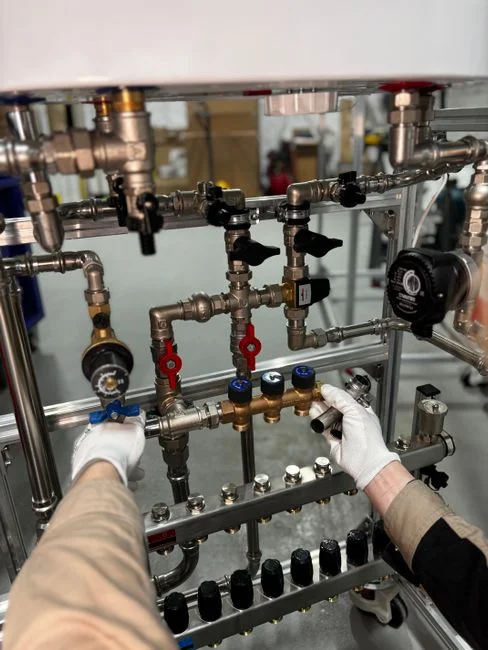
Backwash failure occurs when the cleaning system fails to return the ΔP to baseline despite running on schedule. The backwash sub-system has four components that fail in roughly this order of frequency: the rotating backwash nozzle assembly, the isolation solenoid or pneumatic valve, the booster pump or pressure supply, and the Y-strainer on the backwash water line. Clogged backwash nozzles are the most common field failure; remove one nozzle, inspect for biofilm or scale, and clean with a soft brush and a mild acid soak. Never use metal tools that score the nozzle orifice, because a scratched nozzle distorts the spray pattern and leaves a strip of unwashed disc behind it.
Verify backwash pressure meets OEM spec, typically 3–5 bar at the nozzle for Hydrotech-style disc filters, because low pressure mimics a fouled-disc symptom by leaving solids in place. Check the backwash strainer next: a clogged strainer starves the backwash pump and cripples cleaning without triggering a separate alarm. If the solenoid or pneumatic valve is the fault, the backwash cycle will log as "complete" on the PLC even though no water moved, so install a flow switch on the backwash line if the unit does not already have one (Veolia Hydrotech design references, 2025).
Drum Won't Rotate: Drive, Coupling, and Nozzle Drag
Drum rotation faults stop filtration entirely, requiring immediate verification that the drive is receiving power and the VFD is not in fault. Many disc filters slow the drum to 0.5–1 rpm during backwash, and a stuck VFD mimics a mechanical jam even though the drive is healthy. Read the VFD fault code from the panel before opening any guards, because clearing a fault and resetting the drive takes 30 seconds while pulling a coupling apart takes 30 minutes.
If drive power is present but the drum stalls under no flow, the disc stack is hydraulically locked by fouling; backwash manually with the drum stationary to dislodge the mat before re-energizing rotation to avoid burning out the drive motor. Inspect the drive coupling and gearbox for wear once the drum moves freely, because a worn coupling allows slippage that presents as intermittent rotation under load, and a failing gearbox will run hot to the touch within 10 minutes of operation. Finally, check that the backwash nozzle carriage is not jammed against the disc stack by debris wedged in the nozzle track, which is a frequent cause after a hydraulic upset sends rags or plastic fragments into the filter (HydropureWater field data, 2026).
Effluent TSS Rising Despite Normal ΔP: When the Filter Looks Healthy but Isn't Filtering
The most deceptive fault class is a disc filter that cycles normally but no longer removes solids, indicating the media itself is compromised. Inspect disc media for torn, deformed, or channeled sections, since a single torn disc can let pass-through solids double the effluent TSS even when ΔP reads perfectly clean. Disc replacement is the only fix, and a disc filter running with one compromised disc can blow an entire reuse-permit compliance window if TSS rises above the 5 mg/L typical reuse threshold.
Verify the disc stack compression next, because loose stacks allow influent to bypass around the disc edge rather than through the media; a stack that has lost its preload torque will read normal ΔP while letting 20–40% of the flow short-circuit. Check that the influent flow distribution is even across the disc pack, since uneven flow overloads one section and underutilizes the rest, accelerating media wear on the hot spot. For deeper diagnosis on similar fine-screening faults, see the nanofiltration troubleshooting field guide for the membrane-side analog, where similar bypass symptoms appear at different pressure ranges.
CIP Recovery Procedure: Restoring ΔP After Backwash Stops Working
Clean-In-Place (CIP) is the required maintenance step when mechanical backwash cannot recover baseline ΔP. The protocol below assumes a 2–4 hour planned shutdown, which is typical for a single-vessel disc filter in tertiary duty.
- Isolate the filter, drain the vessel, and confirm the disc stack is fully submerged in CIP solution; partial submersion leaves a dry band that scales faster after restart.
- Circulate the selected acid for 2–4 hours at 30–40 °C; temperature below 25 °C roughly doubles the contact time required.
- Perform a fresh-water rinse and a full backwash cycle, then measure baseline ΔP to confirm recovery; target is a return to <0.2 bar clean.
- Document the CIP result so the maintenance planner can forecast the next CIP interval and budget for media replacement if recovery is partial.
| Scale type | Acid selection | Concentration | Contact time | Temperature |
|---|---|---|---|---|
| Calcium carbonate (general) | Citric acid | 2–4% | 2–4 h | 30–40 °C |
| Iron hydroxide / oxide | Oxalic acid | 1–3% | 2–4 h | 30–40 °C |
| Calcium phosphate | Citric acid (preferred) or dilute HCl | 2–4% / 2–3% | 3–4 h | 30–40 °C |
| Mixed / unknown | Citric acid first, then oxalic if needed | 2–4% | Sequential 2 h each | 30–40 °C |
Use dilute hydrochloric acid only when metallurgy permits, because HCl at >3% will attack 304 stainless components and most seal elastomers within hours. For units that share a pretreatment train with DAF, the upstream FOG loading is often the root cause of accelerated scaling, and the DAF maintenance and troubleshooting guide covers the parallel diagnostic on the front end.
Preventive Maintenance Schedule and When to Call the OEM
Converting the troubleshooting playbook into a routine prevents future alarm pages. Daily, log ΔP trend, backwash cycle count, and effluent TSS on a single trend sheet, because a creeping baseline ΔP is the earliest warning of scale onset, often visible 2–3 weeks before the backwash trigger setpoint is reached. Weekly, inspect backwash nozzles and the Y-strainer, and verify backwash pressure at the gauge reads within ±0.3 bar of OEM spec; pressure drift of more than 0.5 bar usually means a partially clogged strainer.
Quarterly, perform a full mechanical inspection of the drive coupling, seal integrity, and disc stack compression, and re-torque the stack to OEM spec if any disc was pulled for inspection. Annually, replace wear items (seals, nozzle O-rings, drive belts) and consider a planned CIP even if no scaling alarm has triggered, because proactive CIP at 12-month intervals typically extends disc media life by 40–60% in reuse-duty service (HydropureWater field data, 2026). Call the OEM when a CIP fails to recover baseline ΔP, when the disc stack shows visible deformation, or when drive current exceeds nameplate by more than 15% under normal load, because these are signals that the unit has moved beyond field-serviceable repair.
Frequently Asked Questions
What differential pressure should trigger a disc filter backwash?
Most disc filters are programmed to trigger backwash at 0.5–0.7 bar ΔP, with a clean baseline below 0.2 bar. If ΔP exceeds 0.7 bar and does not recover within 2–3 automatic cycles, the discs are scaled and require CIP rather than further backwashing.
How do I know if the discs are fouled or just scaled?
Fouling recovers to baseline ΔP after one or two backwash cycles; scaling does not. Confirm by measuring influent hardness (>200 mg/L as CaCO₃) or iron (>1 mg/L), which are the most common scaling precursors in tertiary duty (HydropureWater field data, 2026).
Which acid should I use for a disc filter CIP?
Use 2–4% citric acid for general carbonate scale at 30–40 °C for 2–4 hours; switch to 1–3% oxalic acid for iron-dominated deposits. Avoid HCl above 3% unless metallurgy documentation specifically permits it.
Why is effluent TSS rising even when ΔP looks normal?
A torn, channeled, or loose disc lets solids bypass the media while ΔP remains normal. Pull one disc and inspect; if damaged, no amount of backwash or CIP will recover performance, and the affected disc element must be replaced. For a parallel diagnostic on membrane systems with similar bypass symptoms, see the ultrafiltration troubleshooting guide.